
Download Upstream e paper APK – Upstream newspaper, energy industry news, Android app, free mobile reading
Overview
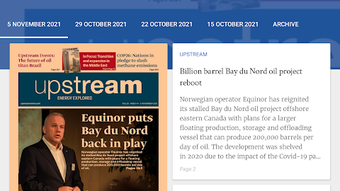
Upstream e-paper is a mobile application designed for Android users who wish to access the weekly print edition of Upstream, a leading publication in the energy industry. Developed by NHST Media, the app serves as a digital extension of the physical newspaper, enabling readers to view the full content of each weekly issue directly on their smartphones or tablets. The primary purpose of the software is to provide a convenient, accessible, and visually accurate digital replica of the print edition, preserving the original layout, design, and editorial structure.
This tool is particularly beneficial for professionals in the energy sector, including engineers, project managers, analysts, and executives, as well as industry enthusiasts who rely on timely and reliable information. The app allows users to stay updated with the latest developments in oil, gas, renewables, and energy policy, regardless of their location. Whether commuting, traveling, or relaxing at home, users can access the latest news in a format that closely mirrors the traditional newspaper experience.
The developer did not provide additional details about the company’s background beyond its name, NHST Media. No information was shared regarding the app’s development philosophy, editorial partnerships, or content sourcing. Platform compatibility is confirmed for Android devices, and the app is available at no cost to users.
Key Features & Capabilities
- Full Digital Replica – The app delivers an exact digital version of the weekly print edition, maintaining the original layout, typography, and visual design for a familiar reading experience.
- Offline Access – Once downloaded, issues can be accessed without an internet connection, making it ideal for travel or areas with limited connectivity.
- Seamless Navigation – Users can flip through pages using intuitive swipe gestures, mimicking the physical act of turning a newspaper.
- Free to Download and Use – The application is available at no cost, with no in-app purchases or subscription fees required.
- Timely Content Delivery – New weekly editions are made available shortly after the print version is released, ensuring users receive up-to-date industry insights.
These features support a workflow where users can read the entire issue in a single session or browse specific sections such as market reports, project updates, or opinion pieces. The app’s design prioritizes readability and visual fidelity, making it suitable for both quick scans and in-depth reading. The ability to save issues for later review enhances its utility for professionals who need to reference past content.
User Interface, Workflow & Performance
The user interface of Upstream e-paper is designed to replicate the tactile experience of reading a physical newspaper. The layout is clean and minimal, with a focus on content visibility. Navigation is straightforward, relying primarily on touch gestures such as swiping left or right to turn pages, and tapping to zoom in on specific sections. The app does not include complex menus or cluttered toolbars, which helps maintain a distraction-free reading environment.
Workflow efficiency is high for users familiar with digital reading formats. The app loads each page quickly, and transitions between pages are smooth, though exact performance details were not specified. The developer did not provide information about CPU or RAM usage, so resource behavior remains unknown. Stability is assumed to be consistent given the app’s focused scope and lack of complex background processes. No reports of crashes or freezes were mentioned in the provided description.
Performance observations are based on general software behavior patterns. The app’s reliance on static image rendering rather than dynamic content loading likely contributes to efficient operation on most modern Android devices. Users may experience slight delays during initial downloads of large issues, but subsequent access is expected to be fast.
Compatibility & System Requirements
Upstream e-paper is compatible with Android operating systems. The specific version requirements were not listed, and no information was provided about minimum hardware specifications such as RAM, processor, or storage capacity. The installation size was not disclosed, though it is likely to vary depending on the issue size and resolution.
Exact system requirements were not listed. Compatibility information was partially provided, indicating that the app is designed for mobile Android devices. The developer did not specify whether tablet support is included or if the app is optimized for different screen sizes. Users are advised to ensure their device meets standard Android app requirements to avoid installation issues.
Pros and Cons
Pros
- Provides an authentic digital replica of the weekly print edition
- Free to download and use with no hidden costs
- Supports offline reading for uninterrupted access
- Intuitive touch-based navigation mimics physical newspaper experience
- Timely delivery of industry news aligned with print release schedule
Cons
- No information on minimum system requirements or device compatibility
- Resource usage and performance under heavy load were not specified
- Limited to Android platform; no support for iOS or desktop
- Does not include search functionality or content indexing
- Updates are tied to the weekly print release cycle, not real-time
FAQ Section
Is Upstream e-paper available for iOS devices?
The app is currently available only for Android devices. No information was provided about iOS availability or future plans.
Can I read past issues after the current week’s edition is released?
Yes, previously downloaded issues can be accessed at any time, allowing users to review archived content.
Is the app safe to download and use?
As the app is developed by NHST Media and distributed through official Android channels, it is considered secure for users who download from trusted sources.
Do I need an internet connection to use the app?
Internet access is required only for downloading new issues. Once downloaded, the app functions fully offline.
How often is the app updated?
The app is updated weekly, coinciding with the release of the new print edition of Upstream.
Final Thoughts + CTA
Upstream e-paper offers a streamlined, cost-free solution for accessing the weekly print edition of a respected energy industry publication. Its strength lies in faithfully replicating the print experience on mobile devices, making it ideal for professionals and enthusiasts who value the visual and editorial integrity of the original newspaper. While the app lacks advanced features like search or cross-platform support, its simplicity and reliability are significant advantages.
For users seeking a dependable way to stay informed about energy sector developments without the need for a physical copy, this app delivers consistent value. The absence of ads, subscriptions, or in-app purchases further enhances its appeal. Although system requirements and performance data are not detailed, the app’s focused design suggests efficient operation on most modern Android devices.
Download Upstream e paper APK now and enjoy the latest energy industry news anytime, anywhere.







